Pramukh IME – Marathi typing software


Hello all, Today we are providing you new software PramukhIME for marathi typing, which was submitted by one of our site visitor “Mahesh”.

After looking into this software we found its very useful and lite too. Lite in the sense for downloading and for typing too. Simply download it on your desktop. And start using it. By using this PramukhIME virtually you can type anywhere. From word pad, excel, ms-word, powerpoint, while writing new emails in marathi etc etc. We are providing you scree shot tutorial and step by step procedure to use this lite and nice software which was created by Vishalon.net.

Step to install this IME on your computer.


1) Download PramukhIME (500kb)
2) Unzip this package on to your computer say on desktop or on “C” or “D” drive or in my documents. Its your choice.
3) Now simply click on PramukhIME.exe and start Pramukh IME.
4) You will see small icon on right side of your desktop (notification area).
5) Now right click on that icon and select Hindi/Marathi/Sanskrit option.

Pramukh IME Marathi typing software

6) Open your favorite word processor and start typing in marathi.
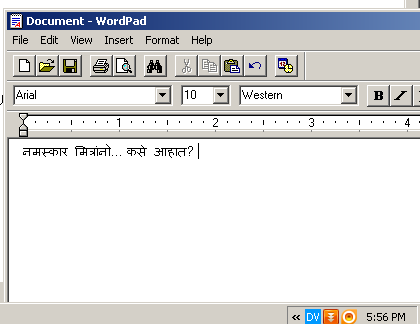
Pramukh IME Marathi typing software

If you cant type even following all these instruction. Read “PramukhIME.chm” help file which have in detail documentation. That’s plus point of developer as he have covered help documentation too.

We hope this PramukhIME will help you for your marathi typing experience. Keep this on your pendrive and start typing in marathi any where,any time. No need of installation.

Leave your feedback and question and reviews about this post and software.


This entry was posted on Tuesday, August 2nd, 2011 at 12:38 pm and is filed under marathi typing, Marathi Typing Software. You can follow any responses to this entry through the RSS 2.0 feed. You can leave a response, or trackback from your own site.

50 Responses to “Pramukh IME – Marathi typing software”

  1. Ganesh Says:

    tha you

  2. vitthal gaddam Says:

    dear sir/ madam

    plz can u send contact details

    regards
    gvitthal

  3. s b kale Says:

    shri ganeshyan maha

  4. harshad Says:

    hni

  5. admin Says:

    Hello vitthal contact us on manjifera at gmail.com

  6. ajay Says:

    hi thanks

  7. vijay Says:

    I was searching for it I owe you thanks

  8. SANJAY Says:

    I AM BUINESS MAN

  9. MRUGESG Rane Says:

    i like it marati taiping

  10. agnelo Says:

    mi marathi

  11. agnelo Says:

    Marathi Language is learn to easy

  12. agnelo Says:

    Marathi is good to hear

  13. satish Says:

    marathi typing most usefull mi

  14. Ganesh godase Says:

    Best software. Download . Dont ignore.

  15. GUND SINHAL Says:

    MAST AHE

  16. रविंद्र Says:

    खर सांगायच झाल तर एकदम झकास आहे. एक सुचना यामध्ये वेगवेगळे फोंट स्टाईल नाही करता येणार का? जसे श्री लिपी मध्ये आहेत.

    पण मला आवडले.

  17. Rajendra Ramdeo Gupta Says:

    मला मराठीत पत्र लिहायेच आहे. खर सांगायचे तर मी जन्माने मुंबईकर पण नावाने उत्तर परदेशी आहे.पण मी या लेखणी द्वारे तुम्हाला सांगू इच्छितो कि मला मराठीत पत्र लिहिण्यास आपली मदद हवी. ती म्हणजे तुम्ही मला एखादा असा सोफ्टवेर ची माहिती द्या ज्याने मी मराठीत आणि फक्त मराठीतच पत्र व्यवहार करीन. माझी निवड एका सहकारी सोसायटीचा मुख्य प्रवर्तकच्या पदासाठी झलेली आहे आणि मला त्या साठी हे हवे होते. तुम्ही माझी मदद कराल हि आशा करतो.

  18. admin Says:

    Rajendra,,

    tumhi pramukh IME cha wapar suru kara. te utttam software aahe,

  19. निपुण Says:

    छान सोफ्ट्वेअर

  20. govind Says:

    hi

  21. prakash pai Says:

    dear sir this marathi software is very easy & good for use.but idont know how can i write PRAKASH. DIFFRENT TYPES SH.

  22. Pramod patil Says:

    Patra vavhar karanekarita marathi typing garagehe ahe.

  23. admin Says:

    Hi Prakash,

    Thank you, Can please be more descriptive? You want to write प्रकाश डिफ़रेंट टाईप….?

    Regards

  24. ankita Says:

    अगदि जे हवे होते तेच मिलाले !!
    धन्यवाद !!

  25. suresh Says:

    अगदि जे हवे होते तेच मिलाले !!
    धन्यवाद !!

  26. param Says:

    I can type in marath in marathi in MS word application please help

  27. admin Says:

    Hi Param,

    Please read instructions to know how to type in marathi using this software. Its easy and explained in simple steps.

    Regards

  28. Murari Says:

    Hello Developer,
    We are soon going to start a website in Marathi and are looking for best available plug-in to write articles with an ease.
    Can you buzz me on my email id for further interaction.

  29. jamil ahemad Says:

    मला हे सॉफटेवेर ms office 07 वापर करायच आहे ते मि कसे करु.

  30. admin Says:

    Hello Jamil,

    Tumhi he software suru karun ms office madhe typing suru kara.

  31. admin Says:

    Hello Murari,

    Better you guys use google’s translation apis for writing articles quickly.

    Thank you.

  32. नहुष खुबाळकर Says:

    आपले शतशः धन्यवाद. अदभूत.

  33. anil Says:

    marathi font chan ahet……..

  34. सोनाली Says:

    सर, धन्यवाद‌!…..पण ओफिस ‘०७ मधे मी मराठीत टाईप केले तरी अक्षरे मरठीत न येता केवळ बॉक्सेस दिसतात. तरी आपली मदत हवी आहे.

  35. सोनाली Says:

    सर मझी अडचण दूर झाली आहे. हे अतीशय चांगले आहे. खूप खूप धन्यवाद!!!!

  36. admin Says:

    Hi Sonali, Chaan tumcha problem solve zala.

  37. ketan s parab Says:

    namaskar, software is very good but i dont get words like chatrapati चत्रपति,or महापुरुश,i.e. mahapurush, om etc. pl help so i feel more easy while typing .

  38. admin Says:

    Hi ketan.

    for typing chtrapati, use “CTrapati” keystrokes and same to mahapurush. You can also view keyboard layout.

    Thank You.

  39. शैलेश खोत Says:

    मला हे सोफ्ट्वेअर खुप आवडले आहे. आधी मी गुगल IME वापरत असे. पण हे खुपच छान आणि सोपे आहे. दुसरी महत्वाची गोष्ट म्हणजे installation चे झंजट नाही. टायपिंग ही खुपच सोपे आहे. मझ्या सॉफ्ट्वेअर बनविणार्‍यांना खुप शुभेच्छा.

  40. admin Says:

    Thank you शैलेश!

  41. Aviraj Says:

    This is very nice application. It doesn’t need any type of font or else. Its very nice.

  42. Mamta Says:

    Thanks for the software!
    Can we use different fonts in it?

  43. admin Says:

    Hi Mamta, No you can’t use different fonts as we know. They are just unicode characters in devnagari.

    Thank You.

  44. Sunil Says:

    pramukhime मध्ये टायपिंग करताना Arial Unicode MS या font मध्ये सिलेक्ट करा.मराठी टायपिंग व्यवस्थित करता येते.

  45. vinayak chavan Says:

    i want devanagari marathi found software

  46. Sohan Says:

    Facebookvar chatting kartana PramukhIMEcha mala vapar karta yeil ka?
    Ani ajun veg-veglyaprakarche UNICODE fonts tumchyapashi aahet ka?

  47. admin Says:

    Ho nakkich waparta yeyil. Ani unicode che fonts sadhya aamchyakade nahit.

    Thank you

  48. गणेश Says:

    खुपच छान यामुळे फेसबुक वर सुद्दा मराठीत लिहता येते खुप खुप आभार!!!!!

  49. राहूल Says:

    काना,मात्रा,वेलान्टी असलेल्या शब्दात अनुस्वार कसा द्यायचा?

  50. admin Says:

    Namaskar rahul anuswar denyasathi tumhi shevati Capital M press kara jo anuswarasathi waparla jato.

    Thank You.

Leave a Reply


Leave comments using your facebook account